


Sıralama

Attention!
Zula Gold Guide
Zula is an action game that local players have been playing for a long time, and special content such as weapons and character appearance in-game is bought with Gold. Gold is credited to the account by entering an epin code on Zula's official website. Since it's not a resource earned through in-game achievement, Gold is only added to the account through purchase. On this page you can find the current Gold packages, how to check current pricing, and the top-up steps.
Zula Gold Packages
Bonus-included packages are offered in tiers from 3,000 Gold up to 150,000 Gold; each package is sold with a bonus added to the base Gold amount. Lower-tier packages are preferred for a small amount of cosmetic content, while upper-tier packages are preferred by long-term players and for more expensive weapon appearances. Since the bonus rate can change as the tier grows, you can compare which tier suits your needs from the package list. Checking the Gold value of weapons or cosmetic items in the store beforehand helps you choose the right tier.
How Much Is Zula Gold in TL
Since Gold package amounts can change over time, rather than giving a fixed figure, it's best to check the current price list on this page. To find the cheapest Zula Gold package, you can review the list from lowest to highest and choose the tier closest to your needs. Checking the list again before placing your order lets you see the current amount.
How to Load Zula Gold
- Choose the Gold package that suits your needs from this page and complete your order.
- Go to Zula's official website and log in with your account.
- Click the Load Gold button on the right side of the screen.
- Select the load epin option on the page that opens.
- Enter the code you bought in the relevant field and confirm.
- Your Gold balance is credited to your account and ready for in-game use.
Points to Note
Once an epin code is used, it cannot be processed again, so you should make sure you're on the correct account before entering the code. It's important to enter the code without spaces and in the correct character order, otherwise the system may consider the code invalid. It can sometimes take a few minutes for the balance to be reflected in your account after the top-up; in that case, restarting the game first is enough to check. Not sharing the code with anyone guarantees that the Gold balance is only loaded into your own account.
What Is Zula Gold Used For
In Zula, Gold is used to change the appearance of the weapons your character uses, unlock special skins, and access some in-game features. Although it's possible to earn a limited amount of resource through in-game missions, buying Gold is a more practical way to reach the weapon appearance you want right away. Whichever item you're targeting, you can check that item's Gold equivalent in the in-game store to choose the package that suits your needs.
When Is a Zula Gold Order Delivered
Right after payment is confirmed, the epin code is displayed on your order page; you can go to Zula's official website and complete the process without needing extra waiting time. Using the code shortly after getting it prevents confusion. During busy campaign periods, there may be a short delay in order processing; in that case, checking your order page again is enough.
Why Oyuneks
At Oyuneks, the code for your Zula Gold order is delivered automatically right after the order is completed, so you can move on to the top-up without waiting. Every order is recorded separately in your order history, so you can see which package you bought and when whenever you want. If you experience an issue with the code, you can get quick help by giving your order number to the live support team. For players who regularly load Gold, these records also serve as a practical reference for tracking their spending.
How to Top Up Zula Gold?
- Log in to oyuneks.com and buy the Zula Gold package you want.
- Go to https://www.zulaoyun.com/ and sign in to your account.
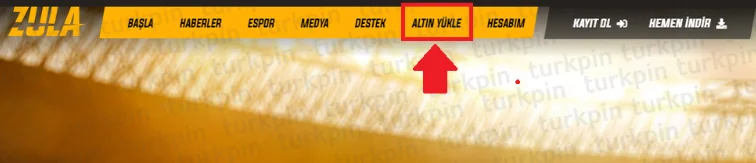
- Click the LOAD GOLD button on the right side of the screen.
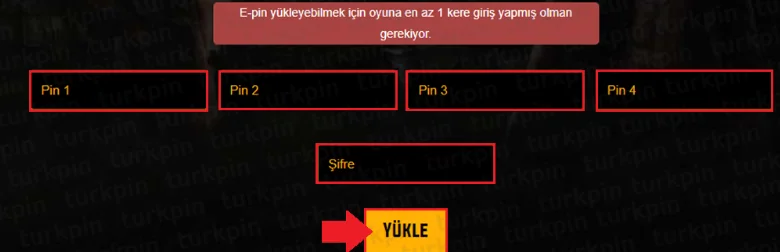
- On the page that opens, click the E-PIN TOP-UP button.

- Enter the code you bought from oyuneks.com to complete the top-up.
That's all!
Cheap Zula Gold is at oyuneks.com!
Your code appears in the orders section of your account as soon as payment is approved. Then: Go to https://www.zulaoyun.com/ and sign in to your account. Click the LOAD GOLD button on the right side of the screen. On the page that opens, click the E-PIN TOP-UP button. Enter the code you bought from oyuneks.com to complete the top-up.
The code is not used on Oyuneks but on zulaoyun.com. Sign in with your own account and paste the code into the relevant field.
Delivery is digital and runs 24/7. Processing starts the moment your payment is approved, and orders placed at night are handled the same way. You can follow your order from the orders section of your account.
Only enter your code in the code field on zulaoyun.com and never share it; the code is single use and is applied to the account that redeems it. Oyuneks never asks for your account password. If you run into trouble, contact 24/7 live support with your order number. Payments are collected through the PayTR payment institution; your card details are never seen or stored by Oyuneks.
Zula 3000 Altın + Bonus is currently 101,44 TL at Oyuneks. The price updates in real time with seller offers; delivery details are shown on the product page.
Zula 5850 Altın + Bonus is currently 179,90 TL at Oyuneks. The price updates in real time with seller offers; delivery details are shown on the product page.
Zula 16.250 Altın + Bonus is currently 449,90 TL at Oyuneks. The price updates in real time with seller offers; delivery details are shown on the product page.
Zula 34.000 Altın + Bonus is currently 899,90 TL at Oyuneks. The price updates in real time with seller offers; delivery details are shown on the product page.
Zula 70.000 Altın + Bonus is currently 1.777,20 TL at Oyuneks. The price updates in real time with seller offers; delivery details are shown on the product page.
Zula 150.000 Altın + Bonus is currently 3.602,84 TL at Oyuneks. The price updates in real time with seller offers; delivery details are shown on the product page.
