


Sıralama

Attention!
Apex Legends Coin Top-Up Guide
Apex Legends Coin is the in-game currency used to buy character outfits, battle passes, and cosmetic content from the game's store. The code you purchase is linked to your EA account, and the balance is spent directly in the game. For players who want to follow the battle pass from day one when a new season starts, preparing your coin balance in advance is an advantage. Since the Apex Legends store updates frequently, players with a ready coin balance can access new content right away. Because this is a code-based top-up system, you don't need to share your EA account password during purchase.
Apex Legends Coin Packages
Apex Legends Coin denominations are sold as 1000 Coins, 2150 Coins, 4350 Coins, 6700 Coins and 11,500 Coins. You can choose a smaller or larger denomination depending on the content you need; if you're planning to buy more than one item, a larger denomination gives you the same balance with fewer transactions. Seeing the coin cost of the outfit or bundle in the store beforehand makes it easier to choose the right denomination. If you plan to shop from the store a few times during the season, choosing one of the larger denominations can be more practical. When choosing between denominations, you can weigh both what you want now and what you plan to buy later. This way you avoid leaving unnecessary coins sitting in your balance. If you don't know the store prices, logging into the game and checking the items first makes choosing a denomination easier. If you plan to shop often, loading a large denomination in one go can also be preferable to topping up your balance in smaller amounts repeatedly.
How Much Is Apex Legends Coin, Prices
You can check the current amount for each denomination in the price list on this page. Since the list can change based on the current exchange rate and campaigns, it's useful to check before buying. When comparing denominations, you can factor in the cost per unit of coin. Reviewing all the options in the list helps you see the advantage that larger denominations provide.
How to Top Up Apex Legends Coin?
- Choose the Apex Legends Coin package you want from this page and complete the purchase.
- Go to www.ea.com/tr-tr/redeem and log in with your EA account.
- Click "Redeem a code."
- Enter the code you purchased in the relevant field and confirm the top-up.
Once the code is confirmed, you can log into the game and check your balance on the store screen. Restarting the game after completing the process can help the updated balance appear. If the balance doesn't show right away, you can wait a few minutes and check again.
Things to Keep in Mind
- You must use the code on the EA account you play Apex Legends with; the balance won't appear on a different account.
- The code is single use and cannot be refunded once redeemed.
- Make sure to enter the letters and numbers completely and without spaces when redeeming the code.
- If you use a different EA account on console versus PC, you must redeem the code on the account of the platform where you'll spend the coin balance.
- You don't need to share your EA account password with anyone; the top-up is completed solely by entering the code.
- If you experience a connection issue while entering the code, check whether your account balance has already updated before trying the code again.
Why Oyuneks?
As soon as your purchase is complete, your Apex Legends Coin code is delivered to your account automatically and stored permanently in the My Orders section. If you run into any issue during the top-up, you can get instant help through live support. This way you can quickly complete your balance without missing seasonal content. You can access it again anytime from your order history without worrying about losing your code. If you want to load coins onto the same account again, you can also complete the process quickly by referencing your previous order.
How to Top Up Apex Legends Coins?
- Sign in to oyuneks.com and buy the Apex Legends Coins package you want.
- Go to https://www.ea.com/tr-tr/redeem and sign in to your account.
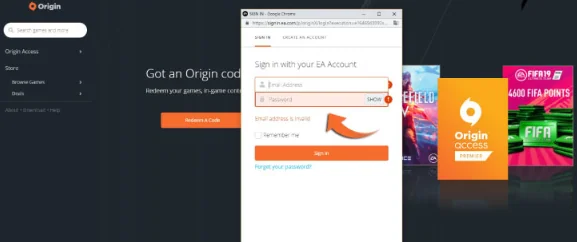
- Click the Redeem a code button.
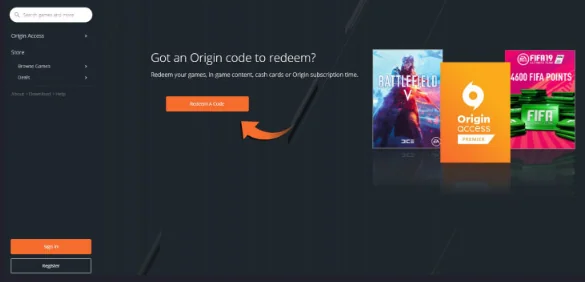
- Enter the code you bought from oyuneks.com to complete the top-up.
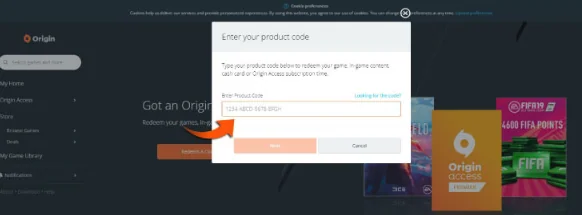
That's it!
For cheap Apex Legends Coins, the right address is oyuneks.com!
Your code appears in the orders section of your account as soon as payment is approved. Then: Go to https://www.ea.com/tr-tr/redeem and sign in to your account. Click the Redeem a code button. Enter the code you bought from oyuneks.com to complete the top-up.
The code is not used on Oyuneks but on ea.com. The code entry page is ea.com/tr-tr/redeem. Sign in with your own account and paste the code into the relevant field.
Any usage restrictions for this product are stated in the product description on this page. Please check them before buying.
Delivery is digital and runs 24/7. Processing starts the moment your payment is approved, and orders placed at night are handled the same way. You can follow your order from the orders section of your account.
Only enter your code in the code field on ea.com and never share it; the code is single use and is applied to the account that redeems it. Oyuneks never asks for your account password. If you run into trouble, contact 24/7 live support with your order number. Payments are collected through the PayTR payment institution; your card details are never seen or stored by Oyuneks.
Apex Legends 1000 Coins is currently 580,90 TL at Oyuneks. The price updates in real time with seller offers; delivery details are shown on the product page.
Apex Legends 11.500 Coins is currently 5.937,50 TL at Oyuneks. The price updates in real time with seller offers; delivery details are shown on the product page.
