


Sıralama



Attention!
BomBom Credits Guide
BomBom is a social app focused on live video chat and streaming. Within the app, users can send gifts to each other, support streamers, and access various features; the balance needed for this is called BomBom Credits and is credited to the account as a coupon in exchange for credits. The higher your credit balance, the greater the variety and size of gifts you can send.
BomBom Credits Packages
On oyuneks.com, BomBom Credits is offered in nine different denominations based on credit amount: packages range from 10 Credits up to 2,500 Credits, each giving a coupon proportional to the credit amount; for example, 10 Credits equals 300 coupons, while 2,500 Credits equals 75,000 coupons. Depending on your needs, you can choose a low-denomination package to send a small amount of support, or a high-denomination package for a bigger gift. For users who frequently support streamers, mid and upper-tier denominations may be more practical, while entry-level packages suit one-time small support.
How Much Is BomBom Credits in TL?
The unit price per credit may vary depending on the size of the package you choose; the best way to see the exact amounts is to check the current price list on this page. You may also want to keep in mind that the cost per credit can be more favorable with larger denominations.
Where Is the BomBom Credits Code Used?
The E-Pin code you purchase is used on 337.com, BomBom's official top-up page. You need to go to this address through a browser rather than through the app itself, log in with your membership information, and complete the top-up process. Before using the code, it's important to select the same coupon amount on the top-up page as the package you purchased. Even if you log in from a different device, your credit balance will keep showing on your account as long as your membership information is the same.
How to Load a BomBom Coupon?
- Log in to oyuneks.com and buy the BomBom Coupon package you want.
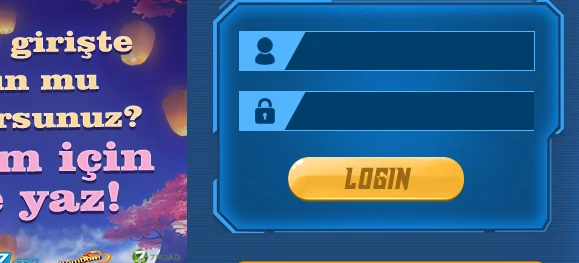
- Go to 337.com and log in as a member.
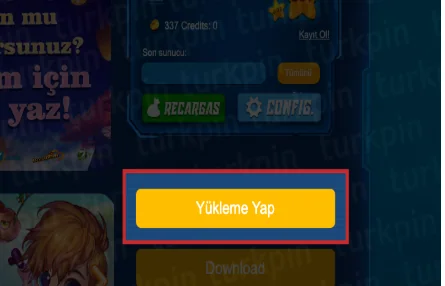
- Click the Top Up button on the right side of the screen.
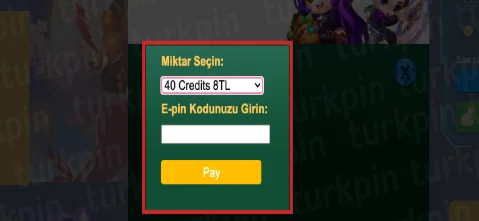
- On the page that opens, select the coupon amount you bought from oyuneks.com.
- Enter the E-Pin code and click the Pay button to complete the process.
Points to Note
When doing the top-up, make sure the coupon amount you select matches exactly the package you purchased; if you select a different amount, the code may not be accepted. Make sure you are logged in with the correct account, because the credit is assigned to the account you're logged in with. Do not share the code with anyone; it is single-use and cannot be refunded once used. If the page loads slowly during the process, trying again after a few minutes is usually enough.
Why Oyuneks?
As soon as your purchase is complete, your E-Pin code is generated automatically and delivered to your account. It stays recorded in your past orders panel, so you can access it from there if you need to see it again. If you run into an issue during the top-up, you can get quick help through live support. Thanks to the wide range of denominations, it's easy to find a package that fits your budget.
When Is a BomBom Credits Order Delivered?
Once your payment is confirmed, your E-Pin code is usually reflected in your account shortly after. During busy periods or when the payment method requires extra verification, delivery may take a few minutes; you can track the order status from your account during this time. After you get the code, you can top up on 337.com whenever you want.
How to Redeem a BomBom Coupon?
- Log in to oyuneks.com and buy the BomBom Coupon package you want.
- Go to https://www.337.com/ and sign in as a member.
- Click the TOP UP button on the right side of the screen.
- On the page that opens, select the BomBom coupon amount you bought from oyuneks.com, enter the e-pin code and click the PAY button.
That's all!
Cheap BomBom Credits is at oyuneks.com!
Your code appears in the orders section of your account as soon as payment is approved. Then: Go to https://www.337.com/ and sign in as a member. Click the TOP UP button on the right side of the screen. On the page that opens, select the BomBom coupon amount you bought from oyuneks.com, enter the e-pin code and click the PAY button.
The code is not used on Oyuneks but on 337.com. Sign in with your own account and paste the code into the relevant field.
Delivery is digital and runs 24/7. Processing starts the moment your payment is approved, and orders placed at night are handled the same way. You can follow your order from the orders section of your account.
Only enter your code in the code field on 337.com and never share it; the code is single use and is applied to the account that redeems it. Oyuneks never asks for your account password. If you run into trouble, contact 24/7 live support with your order number. Payments are collected through the PayTR payment institution; your card details are never seen or stored by Oyuneks.
Bombom 10 Kredi - 300 Kupon is currently 2,00 TL at Oyuneks. The price updates in real time with seller offers; delivery details are shown on the product page.
Bombom 25 Kredi - 750 Kupon is currently 5,00 TL at Oyuneks. The price updates in real time with seller offers; delivery details are shown on the product page.
Bombom 50 Kredi - 1500 Kupon is currently 10,00 TL at Oyuneks. The price updates in real time with seller offers; delivery details are shown on the product page.
Bombom 75 Kredi - 2250 Kupon is currently 15,00 TL at Oyuneks. The price updates in real time with seller offers; delivery details are shown on the product page.
Bombom 150 Kredi - 4500 Kupon is currently 30,00 TL at Oyuneks. The price updates in real time with seller offers; delivery details are shown on the product page.
Bombom 250 Kredi - 7500 Kupon is currently 50,00 TL at Oyuneks. The price updates in real time with seller offers; delivery details are shown on the product page.
