


Sıralama

Attention!
Google Play EURO Guide: How to Load a Euro Balance
The Google Play EURO gift card is a digital code used to add a Euro-denominated balance to the Google Play Store. Since most app, game and digital content purchases on Android devices go through Google Play, this balance can be spent across a wide range in daily use. With this balance you can pay for apps, in-app purchases, movies or subscription fees without linking a credit card. It's a practical solution especially for those who want to top up an account in the Europe region or shop on Google Play without a credit card. Once the balance is added to your account, there's no spending time limit, so you can use it whenever you like for any app or game. For users who don't want to share credit card details or don't want to pay extra fees on foreign transactions, this method offers a more controlled way to shop.
Google Play EURO Card Denominations
Under the Google Play EURO category on Oyuneks there are four different denominations: 15 EURO Gift Card, 25 EURO Gift Card, 50 EURO Gift Card and 100 EURO Gift Card. If you're planning a small in-app purchase, the lower denominations are enough; if you want to cover multiple subscription fees or build up a saved balance, you can choose the higher denominations.
What Is Each Denomination For
Low denominations like 15 EURO and 25 EURO are generally enough for a one-off app or in-game purchase. Larger denominations like 50 EURO and 100 EURO are more suitable for those who want to build a balance that can cover multiple subscription fees for months.
Where to See Google Play EURO Prices
The TL equivalent of each denomination changes according to the current exchange rate and is shown live in the price list on this page. Before buying, you can check the list to see the current amount of the denomination that best suits your needs. Since it's a Euro-based denomination, its TL equivalent can fluctuate during the day based on exchange rate movements.
How Do You Load Google Play EURO?
- Open the Google Play app.
- Tap the profile icon in the top right corner to open the menu and go to Payments and subscriptions.
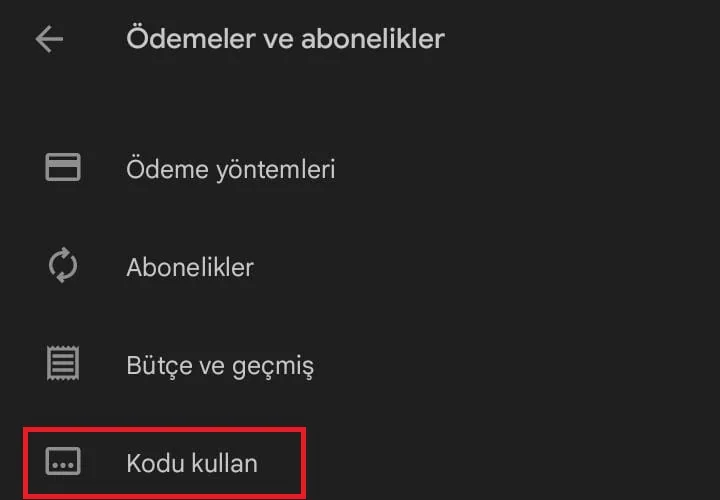
- Tap the Redeem gift code option.
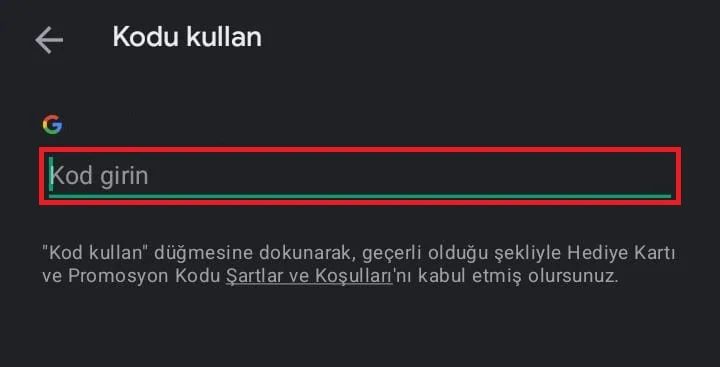
- Enter the code you got from Oyuneks and confirm it to add the balance to your account.
As soon as the code is confirmed, the Euro balance reflects on your account and you can start spending directly from the store.
Things to Watch Out For
Google Play gift cards are produced region-specific, so before entering the code make sure your Google account's region setting matches the Euro region. The code may be considered invalid on an account from a different region. The code can only be used once; you shouldn't share it with anyone or post a screenshot of it, otherwise the balance goes to whichever account enters it first and cannot be reversed. If your Google account has a history of multiple regions, checking your current region setting in the Settings menu before using the code prevents you from running into problems.
Why Oyuneks?
Your Google Play EURO code on Oyuneks is generated automatically at the moment of purchase and delivered to your account, so you don't experience any extra waiting. Your orders remain as a history record in the My Account section, so you can see which code you got and when, anytime you want. If you experience any issue with the code, you can quickly get help through live support. By choosing the denomination closest to your needs among the different options, you both manage your budget correctly and avoid accumulating unnecessary leftover balance.
How to Redeem a Google Play Gift Card?
- Open the Google Play app.
- Tap the profile icon in the top right corner to open the menu, then tap Payments and subscriptions.
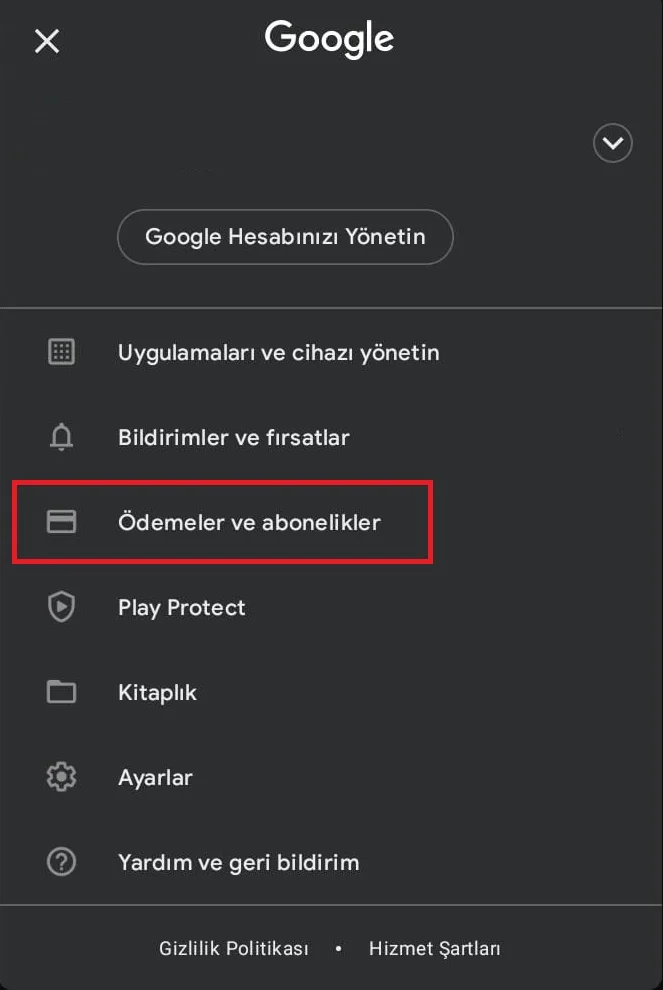
- Tap Redeem gift code.
- Enter the code you bought from Oyuneks and confirm.
For cheap Google Play EURO, the right address is oyuneks.com
Your code appears in the orders section of your account as soon as payment is approved. Then: Open the Google Play app. Tap the profile icon in the top right corner to open the menu, then tap Payments and subscriptions. Tap Redeem gift code. Enter the code you bought from Oyuneks and confirm.
The code is entered on the game's own redeem screen, not on Oyuneks: Tap Redeem gift code. Enter the code you bought from Oyuneks and confirm. You do not need to enter it on any other site.
Valid only on EU accounts. If your account region is different the top-up may fail, so check your account region before buying.
Delivery is digital and runs 24/7. Processing starts the moment your payment is approved, and orders placed at night are handled the same way. You can follow your order from the orders section of your account.
Only enter your code on the game's own redeem screen and never share it; the code is single use and is applied to the account that redeems it. Oyuneks never asks for your account password. If you run into trouble, contact 24/7 live support with your order number. Payments are collected through the PayTR payment institution; your card details are never seen or stored by Oyuneks.
Google Play 15 EURO Gift Card is currently 940,90 TL at Oyuneks. The price updates in real time with seller offers; delivery details are shown on the product page.
Google Play 25 EURO Gift Card is currently 1.762,90 TL at Oyuneks. The price updates in real time with seller offers; delivery details are shown on the product page.
Google Play 50 EURO Gift Card is currently 3.172,90 TL at Oyuneks. The price updates in real time with seller offers; delivery details are shown on the product page.
Google Play 100 EURO Gift Card is currently 5.890,90 TL at Oyuneks. The price updates in real time with seller offers; delivery details are shown on the product page.
