


Sıralama



Attention!
Free Fire Diamond EU-TR Guide
Free Fire is one of the mobile battle royale games, and content such as character outfits, weapon skins, pets, and battle passes in-game is purchased with Diamonds. For accounts registered on the EU-TR server, Diamonds are credited to the account by entering your player ID through Garena's official top-up page. Since Diamonds are earned only through purchase and not through in-game achievements, it's important to choose the right amount for your needs. On this page you can find the current Diamond packages valid for EU-TR, how to check current pricing, and the top-up steps.
Free Fire Diamond Packages
For the EU-TR server, bonus-included packages are offered from 100+25 Diamonds up to 2200+550 Diamonds; the second number in each package shows the bonus Diamonds added to the base amount purchased. Lower-tier packages may be advantageous for a small amount of outfits or a temporary event, while upper-tier packages are better for a battle pass and multiple items. Since the bonus amount tends to increase with higher tiers, players who want to cover their needs in bulk generally prefer the higher tiers. Checking the Diamond value of in-game store items beforehand and choosing the tier closest to that amount prevents your balance from being too little or too much.
How Much Is Free Fire Diamond in TL
Since Diamond package amounts can change over time, rather than giving a fixed figure, the best method is to check the current price list on this page. To find the cheapest Free Fire Diamond EU-TR package, you can review the list from lowest to highest and choose the tier closest to your needs. Checking the list right before placing your order lets you see the current amount.
How to Load Free Fire Diamonds
- Choose the Diamond package that suits your needs from this page and complete your order.
- Go to Garena's official top-up page and log in with your account.
- Select the Free Fire game.
- Verify your account by entering your player ID correctly.
- Enter the code you purchased in the Garena Shell code field.
- After confirming, the Diamonds are credited to your account.
Points to Note
Since the top-up is done via player ID, you must make sure you enter the correct ID during the order; otherwise the Diamonds go to a different account and this cannot be reversed. EU-TR packages only work on accounts registered to this region; the code may be considered invalid on an account opened from a different region. Copying and pasting your player ID from the in-game profile section prevents errors that can occur when typing it manually. If you're not sure which server your account is registered to, you can check from the in-game settings section.
When Is a Free Fire Diamond Order Delivered
Right after your payment is confirmed, the code is displayed on your order page, and you can go to Garena's top-up page and complete the process without any extra waiting time. There's no risk of the code losing its validity over a long period, but it's still better to use it shortly after getting it to avoid confusion. During busy campaign periods, there may be a short delay in order processing; in that case, checking your order page again is usually enough.
Why Oyuneks
At Oyuneks, the code for your Free Fire Diamond EU-TR order is delivered automatically right after the order is completed, so you can move on to the top-up without extra waiting. It stays recorded in your order history, so you can check which package you bought and when whenever you want. If you experience an issue during the top-up, you can get a quick solution by giving your order number and player ID to the live support team. For players who regularly load Diamonds, the order history also serves as a practical record for tracking past purchases.
Review Publishing Criteria
* You must have purchased this product to leave a review.
All reviews (3)
DA
12.12.2024 17:44:39
Deha A.
Hızlı ve güvenilir anlık teslimat sorunsuz
AŞ
09.12.2024 15:59:20
Ahmet Ş.
aşırı hızlı geldi şaşırdım
How to Top Up Free Fire Diamonds (EU-TR)?
- Log in to oyuneks.com, choose the Free Fire Diamonds package you want and buy it.
- Go to Garena's official top-up page and sign in.
- Select the Free Fire game.
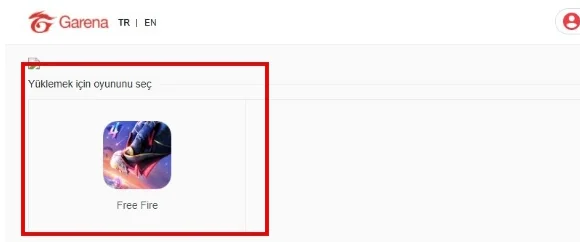
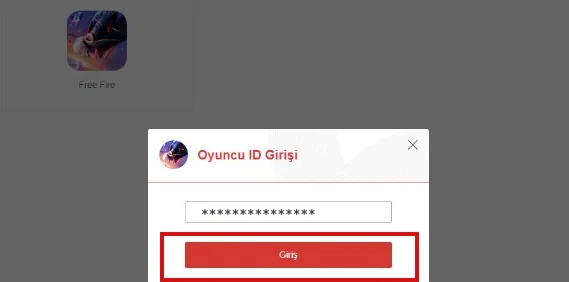
- Sign in to your account by entering your player ID.
- Type the code you bought from oyuneks.com into the Garena Prepaid Card Code field and click the confirm button.
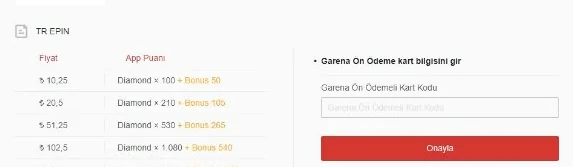
Your code appears in the orders section of your account as soon as payment is approved. Then: Go to Garena's official top-up page and sign in. Select the Free Fire game. Sign in to your account by entering your player ID. Type the code you bought from oyuneks.com into the Garena Prepaid Card Code field and click the confirm button.
The code is entered on the game's own redeem screen, not on Oyuneks: Type the code you bought from oyuneks.com into the Garena Prepaid Card Code field and click the confirm button. You do not need to enter it on any other site.
Delivery is digital and runs 24/7. Processing starts the moment your payment is approved, and orders placed at night are handled the same way. You can follow your order from the orders section of your account.
Only enter your code on the game's own redeem screen and never share it; the code is single use and is applied to the account that redeems it. Oyuneks never asks for your account password. If you run into trouble, contact 24/7 live support with your order number. Payments are collected through the PayTR payment institution; your card details are never seen or stored by Oyuneks.
Free Fire Free Fire 100+25 Elmas EU-TR is currently 47,90 TL at Oyuneks. The price updates in real time with seller offers; delivery details are shown on the product page.
Free Fire Free Fire 210+53 Elmas EU-TR is currently 100,38 TL at Oyuneks. The price updates in real time with seller offers; delivery details are shown on the product page.
Free Fire Free Fire 530+133 Elmas EU-TR is currently 234,90 TL at Oyuneks. The price updates in real time with seller offers; delivery details are shown on the product page.
Free Fire Free Fire 1080+270 Elmas EU-TR is currently 468,90 TL at Oyuneks. The price updates in real time with seller offers; delivery details are shown on the product page.
Free Fire Free Fire 2200+550 Elmas EU-TR is currently 949,59 TL at Oyuneks. The price updates in real time with seller offers; delivery details are shown on the product page.

Free Fire Elmas Elmas EU-TR