


Sıralama




Attention!
Silkroad Online TR (Gamegami) Silk Guide
On Gamegami, the Turkey server of Silkroad Online, Silk is the currency used to get character-specific items, upgrades, and in-game advantages. The higher your Silk balance, the wider the range of upgrade and cosmetic options in your inventory. Silk is assigned to your account through a digital code and is processed securely without you needing to share your account information. On Gamegami, one of the servers that has been actively played for many years, the Silk balance continues to be an important part of character development.
Silk Denominations
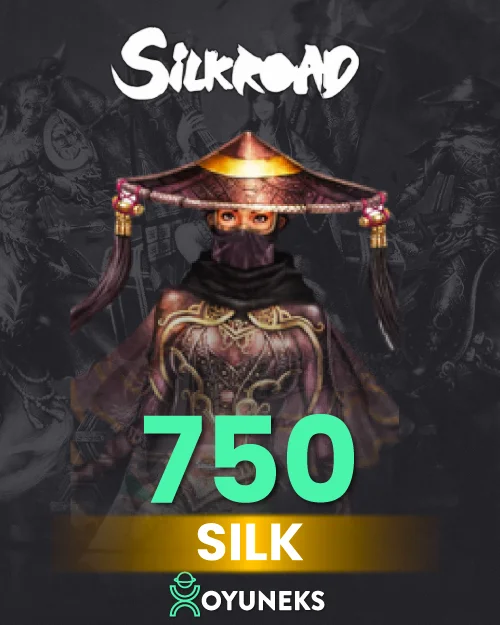
At oyuneks.com, Gamegami Silk is sold in five different denominations: 100, 300, 500, 750, and 1,100 Silk. Small denominations suit short-term needs, while larger packages like 750 and 1,100 Silk can be more advantageous for players who play regularly and update their inventory frequently. Depending on your character's level and the items you're targeting, you can choose between buying one large package at once or progressing with small packages as needed.
How Much Is Silkroad Silk in TL?
You need to check the price list on this page to see the amount difference between denominations and the current prices; prices are updated from time to time due to exchange rate based changes. You may see different amounts for the same denomination on different days, and this is usually related to exchange rate movements.
Where Is the Silkroad Gamegami Silk Code Used?
The code you buy is only valid on Gamegami, the Turkey server of Silkroad Online. After logging into your account, you can use the code by accessing the Epin Loading option from the Load Silk section in-game. Trying the code on a different platform or a different Silkroad version won't produce a result, so checking that you're on the correct server should be your first step. Most of the items in your character's inventory are sold in exchange for Silk, so regularly tracking your Silk balance helps you not miss opportunities in-game.
How to Top Up Silkroad Gamegami Silk?
- Log in to oyuneks.com, choose the Silkroad Gamegami Silk package you want, and buy it.
- Log in to your Silkroad account.
- Click the Load Silk button at the top right corner of the screen.
- Switch to the Epin Loading option on the page that opens.
- Enter the code you got from oyuneks.com and complete the top-up process.
Things to Watch Out For
The Gamegami Silk code is only valid on the Turkey (Gamegami) server of Silkroad Online; it doesn't work on a different server version. Make sure you're logged in with the correct account before entering the code, because Silk is assigned directly to the account you choose. The code is single-use; if you share it with someone else, whoever uses it first gets the balance and the transaction cannot be reversed. If you have trouble accessing the top-up page, keeping your browser up to date and disabling the pop-up blocker can help.
Why Oyuneks?
The moment your order is confirmed, your code is automatically generated and sent to your account. Your past purchases stay recorded in your order history, so you can access them there if you need to see the code again. If you experience an issue during the top-up, you can get help through the live support line. Thanks to five different denomination options, you can use your budget efficiently by choosing the amount closest to your need.
When Is a Silkroad Gamegami Silk Order Delivered?
Once payment is confirmed, the Silk code usually reflects on your account and order history shortly after. This time may extend a bit during busy hours or in cases requiring additional verification depending on the payment method; in such a case you can track the order status from your panel. Once you receive the code, you can load it into the game whenever you want; there's no expiration pressure.
How to Top Up Silkroad Gamegami Silk?
- Log in to oyuneks.com, choose the Silkroad Gamegami Silk package you want and buy it.
- Sign in to your Silkroad account.
- Click the Load Silk button at the top right.
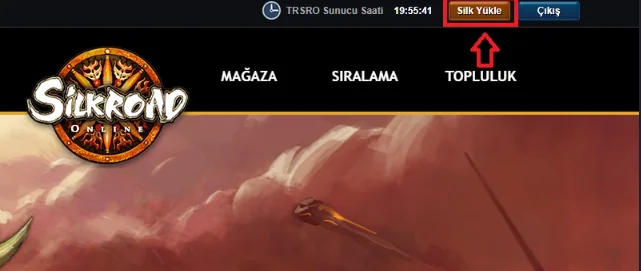
- On the page that opens, click the E-pin Top-Up button.
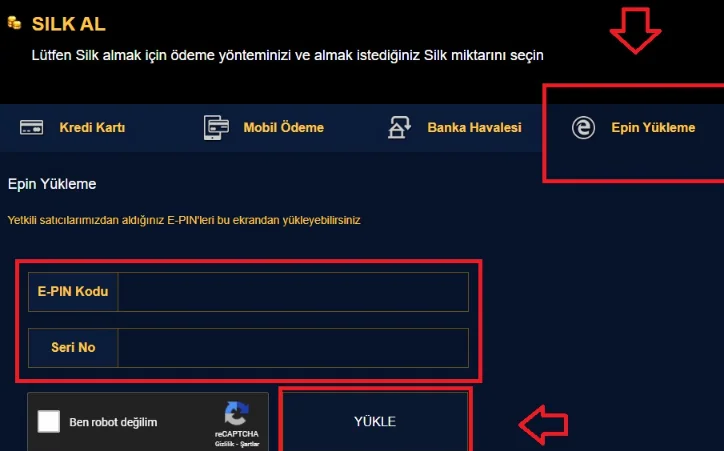
- Enter the code you bought from oyuneks.com to complete the top-up.
Your code appears in the orders section of your account as soon as payment is approved. Then: Sign in to your Silkroad account. Click the Load Silk button at the top right. On the page that opens, click the E-pin Top-Up button. Enter the code you bought from oyuneks.com to complete the top-up.
The code is entered on the game's own redeem screen, not on Oyuneks: Enter the code you bought from oyuneks.com to complete the top-up. You do not need to enter it on any other site.
Delivery is digital and runs 24/7. Processing starts the moment your payment is approved, and orders placed at night are handled the same way. You can follow your order from the orders section of your account.
Only enter your code on the game's own redeem screen and never share it; the code is single use and is applied to the account that redeems it. Oyuneks never asks for your account password. If you run into trouble, contact 24/7 live support with your order number. Payments are collected through the PayTR payment institution; your card details are never seen or stored by Oyuneks.
Silkroad Online TR 100 Silk Gamegami is currently 100,00 TL at Oyuneks. The price updates in real time with seller offers; delivery details are shown on the product page.
Silkroad Online TR 300 Silk Gamegami is currently 300,00 TL at Oyuneks. The price updates in real time with seller offers; delivery details are shown on the product page.
Silkroad Online TR 500 Silk Gamegami is currently 500,00 TL at Oyuneks. The price updates in real time with seller offers; delivery details are shown on the product page.
Silkroad Online TR 750 Silk Gamegami is currently 700,00 TL at Oyuneks. The price updates in real time with seller offers; delivery details are shown on the product page.
Silkroad Online TR 1100 Silk Gamegami is currently 1.000,00 TL at Oyuneks. The price updates in real time with seller offers; delivery details are shown on the product page.
