


Sıralama



Attention!
Lifebox Membership Guide
Lifebox is a storage service used to store data such as files, photos, and videos in the cloud. When the free quota isn't enough, fixed-term membership packages are purchased for extra storage space. These packages are assigned to your account with an activation code and are ready to use right after purchase. Extra storage offers a practical solution both for a user who wants to back up the photos on their phone and for one who wants to keep work files in the cloud. On this page you can find the current Lifebox membership packages, how to reach the current price information, and the top-up steps.
Lifebox Membership Packages
Currently two different membership packages are offered, with 500 GB and 2.5 TB capacity, valid for a 12-month period. The 500 GB package is enough for users who back up daily photos and documents, while the 2.5 TB package is a more suitable option for users working with videos and large files. Evaluating in advance which capacity will be enough for you based on your need helps you choose the right package. It's useful to check your current usage through the Lifebox app and estimate how much extra space you need.
How Much Is Lifebox Membership
Since the amount of the packages can change over time, rather than giving a fixed figure, it's best to check the current price list on this page. You can compare the 500 GB and 2.5 TB packages and choose the one that best fits your need. Since you're planning annual usage, it's useful to check the current amounts once more before placing an order.
How to Top Up Lifebox Membership
- Choose the Lifebox membership package that fits your need from this page and complete your order.
- Go to mylifebox.com and log in with your existing account.
- Click the Usage and Packages button at the bottom left of the page.
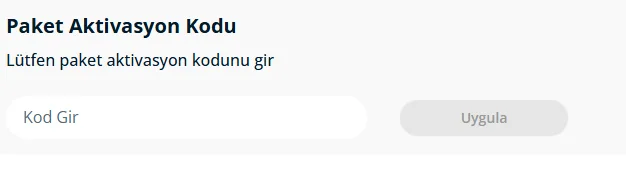
- Enter the code you purchased into the package activation code field at the top of the screen.
- Confirm to complete the process.
- Your extra storage space is immediately assigned to your account.
Things to Watch Out For
Make sure your account is correct when entering the activation code, because the code is assigned to a single account and cannot be used on another account. Since these are fixed-term membership packages, if you assign the new code before your current membership ends, the duration is usually added on top of your existing membership; you can check this detail from the membership status section in your account. Being careful not to make letter or number errors when entering the code prevents you from encountering an unnecessary error message. If you're planning to get a new code close to your membership's end date, it's good to prepare in advance so the duration isn't interrupted.
When Is a Lifebox Membership Order Delivered?
Right after payment is confirmed, the activation code is displayed on your order page, and you can do the assignment process on mylifebox.com without any extra waiting time. Using the code shortly after receiving it prevents confusion. During busy campaign periods there may be a short delay in order processing; in that case it's enough to check your order page again.
Why Oyuneks
At Oyuneks, the activation code for a Lifebox membership order is automatically delivered right after the order is completed, so you can activate the code without waiting. It stays recorded in every order history, so you can view again which package you bought and when whenever you need. If you experience an issue during activation, you can get quick help by providing your order number to the live support team. For users who renew their membership every year, the order history is also a practical record for remembering which capacity was purchased when.
How to redeem
- Log in to oyuneks.com, choose the Lifebox Gift Code package you want and buy it.
- Go to mylifebox.com and sign in as a member.
- Click the "Usage & Packages" button at the bottom left of the page.
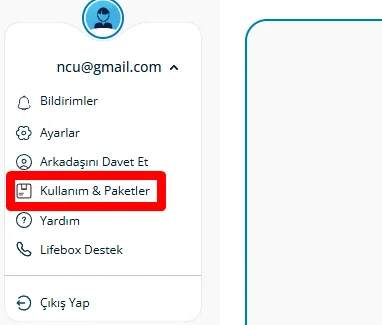
- Type the code you got from Oyuneks into the "Package Activation Code" field at the top of the screen and complete the process.
Cheap Lifebox Gift Code is at oyuneks.com
Your code appears in the orders section of your account as soon as payment is approved. Then: Go to mylifebox.com and sign in as a member. Click the "Usage & Packages" button at the bottom left of the page. Type the code you got from Oyuneks into the "Package Activation Code" field at the top of the screen and complete the process.
The code is not used on Oyuneks but on mylifebox.com. Sign in with your own account and paste the code into the relevant field.
Delivery is digital and runs 24/7. Processing starts the moment your payment is approved, and orders placed at night are handled the same way. You can follow your order from the orders section of your account.
Only enter your code in the code field on mylifebox.com and never share it; the code is single use and is applied to the account that redeems it. Oyuneks never asks for your account password. If you run into trouble, contact 24/7 live support with your order number. Payments are collected through the PayTR payment institution; your card details are never seen or stored by Oyuneks.
Lifebox 500 GB 12 Aylık is currently 431,32 TL at Oyuneks. The price updates in real time with seller offers; delivery details are shown on the product page.
Lifebox 2.5 TB 12 Aylık is currently 1.348,23 TL at Oyuneks. The price updates in real time with seller offers; delivery details are shown on the product page.
