


Sıralama

Attention!
Cabal Online eCoin EU Guide
Cabal Online eCoin is the digital currency you use for item mall purchases on the game's European server. Costumes that change your character's appearance, enhancement stones, and special items are sold in the item mall in exchange for eCoin. You can shop directly from the in-game store with this balance and develop your character however you want. For players who don't want to enter their credit card information directly into their game account, top-up by code is one of the most practical ways to add balance.
eCoin Packages: Amounts and Uses
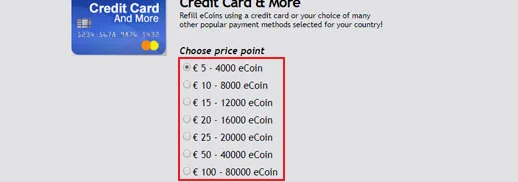
This page offers different amounts of eCoin packages, from small needs to large purchases. If you want to buy a single cosmetic item, a low-amount package is enough, while if you're planning to buy several enhancement or costume sets together, a higher-amount package is more economical. If you want to comprehensively strengthen your character in the long run, choosing large packages lowers your unit cost.
- 4000 eCoin and 8000 eCoin are suitable for small-scale item mall purchases
- 12,000, 16,000, and 20,000 eCoin cover mid-scale costume and enhancement needs
- 40,000 and 80,000 eCoin are advantageous for players planning a bulk purchase
How Much Is eCoin, How to See Its Prices
The current amount of each package is listed in the price list at the top of this page. Comparing amounts and prices here before purchasing helps you choose the package that suits you best.
How Is eCoin Topped Up?
- Choose the Cabal eCoin package you want via Oyuneks.com and complete the purchase
- Go to eu.playthisgame.com and log in with your account
- Click your profile name at the top right and open the Ecoin Store section
- Click Credit Card & More and find the package that matches the code you bought
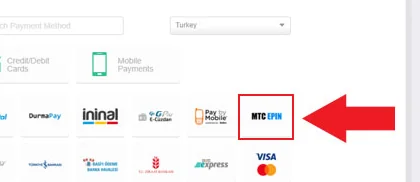
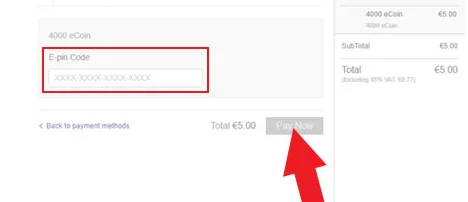
- Choose MTC Epin as the payment method, enter your code, and complete the top-up
Points to Watch Out For
Before using the code, you must make sure you're logged in with the correct account registered on the European server, because eCoin codes are region-specific and cannot be used on a different account. Marking the correct option as the payment method when entering the code ensures the transaction completes without an error. Using the code within a reasonable time after receiving it reduces the risk of it being accidentally shared with someone else. If the page refreshes during the top-up, checking the balance on your account before restarting the transaction prevents the same code from being entered twice. If you experience display issues caused by your browser cache, checking your eCoin balance from your account summary before refreshing the page helps you understand whether the top-up has actually been completed.
Why Oyuneks?
The eCoin code you buy reaches your account automatically as soon as the payment is confirmed. You can view your past eCoin purchases again at any time from your order history and easily track how much you loaded and when. If you encounter a problem during the top-up, you can quickly get help through live support.
Paying with a code lets you shop without entering your card information on the item mall page, which is an advantage especially for those making transactions from shared computers, in terms of security. Loading your eCoin balance package by package according to your need, instead of spending it all at once, lets you manage your budget more in control. Following campaign periods when some items are sold at a discount in the item mall can help you use your eCoin balance more efficiently; so it makes sense to check the store before a big purchase.
How to Top Up Cabal eCoin?
- Log in to oyuneks.com, choose the Cabal eCoin package you want and buy it.
- Go to https://eu.playthisgame.com/tr and sign in to your account.
- Click your profile name at the top right, then choose ECOIN SHOP.

- Click the Credit Card & More option.
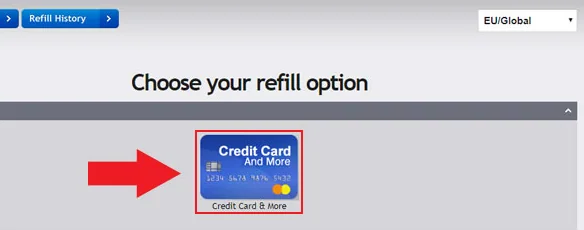
- From the options that appear, choose the package matching the code you bought.
- Choose MTC EPIN as the payment method.
- Enter the code you bought from oyuneks.com to complete the top-up.
Cheap Cabal eCoin is at oyuneks.com!
Your code appears in the orders section of your account as soon as payment is approved. Then: Go to https://eu.playthisgame.com/tr and sign in to your account. Click your profile name at the top right, then choose ECOIN SHOP. Click the Credit Card & More option. Choose MTC EPIN as the payment method. Enter the code you bought from oyuneks.com to complete the top-up.
The code is not used on Oyuneks but on eu.playthisgame.com. The code entry page is eu.playthisgame.com/tr. Sign in with your own account and paste the code into the relevant field.
Delivery is digital and runs 24/7. Processing starts the moment your payment is approved, and orders placed at night are handled the same way. You can follow your order from the orders section of your account.
Only enter your code in the code field on eu.playthisgame.com and never share it; the code is single use and is applied to the account that redeems it. Oyuneks never asks for your account password. If you run into trouble, contact 24/7 live support with your order number. Payments are collected through the PayTR payment institution; your card details are never seen or stored by Oyuneks.
Cabal Online 4000 eCoin is currently 300,00 TL at Oyuneks. The price updates in real time with seller offers; delivery details are shown on the product page.
Cabal Online 8000 eCoin is currently 600,00 TL at Oyuneks. The price updates in real time with seller offers; delivery details are shown on the product page.
Cabal Online 12.000 eCoin is currently 900,00 TL at Oyuneks. The price updates in real time with seller offers; delivery details are shown on the product page.
Cabal Online 16.000 eCoin is currently 1.200,00 TL at Oyuneks. The price updates in real time with seller offers; delivery details are shown on the product page.
Cabal Online 20.000 eCoin is currently 1.500,00 TL at Oyuneks. The price updates in real time with seller offers; delivery details are shown on the product page.
Cabal Online 40.000 eCoin is currently 3.000,00 TL at Oyuneks. The price updates in real time with seller offers; delivery details are shown on the product page.
