


Delivered as a Gpay Epin. This is a Tier 1 subscription. Valid in the TR region.
Sale price
4.400,00 TL
Delivery
instant
Seller
OYUNEKS
4.400,00 TL
Type a total and the quantity is calculated for you
Other Products
Twitch Abonelik TL Kademe 1 Abonelik - 1 Months
44,00 TL
Kademe 1 Abonelik - 1 Months
44,00 TL
 Kademe 1 Abonelik - 3 Months KAMPANYA
120,00 TL
Kademe 1 Abonelik - 3 Months KAMPANYA
120,00 TL
 Kademe 1 Abonelik - 6 Months KAMPANYA
224,00 TL
Kademe 1 Abonelik - 6 Months KAMPANYA
224,00 TL
 Kademe 2 Abonelik - 1 Months KAMPANYA
88,00 TL
Kademe 2 Abonelik - 1 Months KAMPANYA
88,00 TL
 Kademe 2 Abonelik - 3 Months KAMPANYA
240,00 TL
Kademe 2 Abonelik - 3 Months KAMPANYA
240,00 TL
 Kademe 2 Abonelik - 6 Months KAMPANYA
450,00 TL
Kademe 2 Abonelik - 6 Months KAMPANYA
450,00 TL
 Kademe 3 Abonelik - 1 Months KAMPANYA
220,00 TL
Kademe 3 Abonelik - 1 Months KAMPANYA
220,00 TL
 Kademe 3 Abonelik - 3 Months KAMPANYA
583,00 TL
Kademe 3 Abonelik - 3 Months KAMPANYA
583,00 TL
 Kademe 3 Abonelik - 6 Months KAMPANYA
1.102,00 TL
Kademe 3 Abonelik - 6 Months KAMPANYA
1.102,00 TL
 Hediye Abonelik (1 pcs)
44,00 TL
Hediye Abonelik (1 pcs)
44,00 TL
 Hediye Abonelik (5 pcs)
220,00 TL
Hediye Abonelik (5 pcs)
220,00 TL
 Hediye Abonelik (10 pcs)
450,00 TL
Hediye Abonelik (10 pcs)
450,00 TL
 Hediye Abonelik (20 pcs)
880,00 TL
Hediye Abonelik (20 pcs)
880,00 TL
 Hediye Abonelik (50 pcs)
2.200,00 TL
Hediye Abonelik (50 pcs)
2.200,00 TL
 Hediye Abonelik (100 pcs)
4.400,00 TL
SELECTED
Hediye Abonelik (100 pcs)
4.400,00 TL
SELECTED
Twitch Subscription TL Guide: What Is This Product For?
A Twitch subscription is one of the most common ways to subscribe to the channel of a streamer you watch and to directly support that streamer. With a subscription you get benefits like ad-free viewing, use of custom emotes, and a subscriber chat badge. Just as you can subscribe for yourself, you can also gift bulk memberships to a community with gift subscription packages.
As the tier goes up, the benefits also increase; higher tiers unlock more custom emotes and, on some streamers, additional chat badges. If you want to support a streamer you've followed for a long time, it makes sense to choose the tier based on the benefits they offer.
Twitch Subscription TL Packages
On Oyuneks, Twitch Subscription TL is sold in different packages based on tier and duration. Tier 1, Tier 2 and Tier 3 subscriptions come with 1, 3 and 6 month options; longer-duration packages come with discounted pricing. If you want to send a gift to a community instead of for your own account, you can choose one of the gift subscription packages of 1, 5, 10, 20, 50 and 100 units.
How Much Is Twitch Subscription TL?
The price of the package changes based on its tier, duration, and, for gift subscriptions, the number of units; you can see the current amount of each package in the up-to-date price list on this page. Discounted duration packages usually offer a better unit price on a monthly basis, so if you're planning to stay subscribed long-term, it's worth comparing the 3-month or 6-month options.
How Do You Load Twitch Subscription TL?
- Log into Oyuneks.com, choose the Twitch Subscription package you want and buy it.
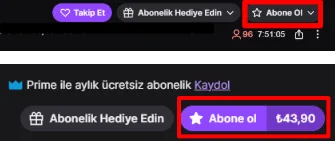
- On Twitch, click the Subscribe button at the bottom right of the stream you want to subscribe to, then select Subscribe again.
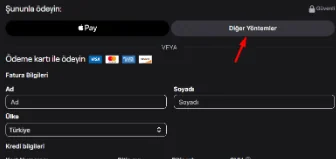
- On the page that opens, click the Other Methods option.
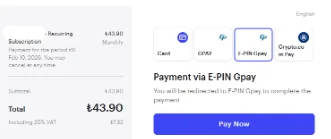
- Find the E-PIN Gpay option among the payment options and continue with the PAY NOW button.
- Enter the confirmation code sent to your phone and click the Log In button, then complete your payment using the code you got from Oyuneks.
Things to Watch Out For
For gift subscription packages, you should make sure you've chosen the correct channel before starting the transaction, because a subscription cannot be refunded once sent. Tier pricing can differ from streamer to streamer, so you need to confirm on the stream page which tier you want. Using the code directly in the payment flow rather than sending a screenshot before sharing it prevents the code from being consumed by someone else.
When your subscription expires, your auto-renew setting may be turned on; if you want to resubscribe with a different duration or tier, you need to check when your current subscription will end. For the person you send a gift subscription to be able to see the notification, it's enough for them to be active in the channel's chat section. Entering the confirmation code sent to your phone correctly during the payment step ensures the transaction completes without interruption. After the subscription transaction is complete, you can see the subscriber badge on the stream screen, confirming your subscription is active. If you experience an issue during the process, refreshing the page and following the steps again from the start usually solves the problem.
Why Oyuneks?
Your Twitch Subscription TL order on Oyuneks is delivered automatically the moment payment is confirmed, and you can view your code again anytime from your order history. If you have a problem during loading, you get instant help through the live support line. If you regularly send subscriptions or gift subscriptions to different streamers, you can track your past orders from your order history.
No reviews yet
Customers who bought this product can leave a review; the first one will appear here.
How to Top Up Twitch Subscription TL?
- Log in to oyuneks.com and select and purchase the Twitch Subscription package you want.
- Click the Subscribe button in the bottom-right corner of the stream you want to subscribe to on Twitch, then select Subscribe again.
- On the page that opens, click Other Methods.
- Find the E-PIN Gpay option among the payment options and click the PAY NOW button to continue.
- Enter the full confirmation code sent to your phone and click the Log In button.
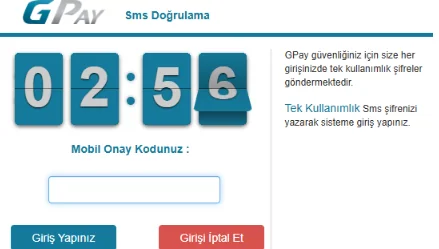
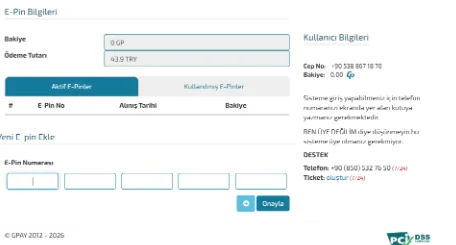
- On the page you are logged into, you can use one or more Gpay e-pins. By keeping your balance, you can use it for future purchases on all games and platforms that support the Gpay payment method. You can track your active balance below the phone number information on the right side of the screen.
That's it! The right address for Cheap Twitch Subscription is oyuneks.com!
