Loaded to your player ID. Global. (24000 UC + 8400 Bonus)
Sale price
17.381,90 TL
19.904,00 TL
13% OFF
You save 2.522,10 TL
Delivery
instant
Seller
OYUNEKS
You can purchase 1 unit of this product at a time. Please create a new cart for an additional purchase.
Other Products
PUBG Mobile UC ID Yükleme Global Royale Pass Global ID
266,90 TL
Royale Pass Global ID
266,90 TL
 Elite Royale Pass Global ID
485,12 TL
Elite Royale Pass Global ID
485,12 TL
 Elite Pass Plus Global ID
1.191,49 TL
Elite Pass Plus Global ID
1.191,49 TL
 60 UC Global ID
44,90 TL
60 UC Global ID
44,90 TL
 325 UC Global ID
221,90 TL
325 UC Global ID
221,90 TL
 660 UC Global ID
443,90 TL
660 UC Global ID
443,90 TL
 1,800 UC Global ID
1.110,90 TL
1,800 UC Global ID
1.110,90 TL
 3,850 UC Global ID
2.197,90 TL
3,850 UC Global ID
2.197,90 TL
 8,100 UC Global ID PROMO
4.345,90 TL
8,100 UC Global ID PROMO
4.345,90 TL
 16,200 UC Global ID
8.690,90 TL
16,200 UC Global ID
8.690,90 TL
 24,300 UC Global ID
13.036,90 TL
24,300 UC Global ID
13.036,90 TL
 32,400 UC Global ID
17.381,90 TL
SELECTED
32,400 UC Global ID
17.381,90 TL
SELECTED
 40,500 UC Global ID
21.726,90 TL
40,500 UC Global ID
21.726,90 TL
PUBG Mobile UC ID Top-Up Guide (Global)
On the PUBG Mobile Global server, UC is the in-game currency used to buy content like character outfits, weapon skins, emotes, and the Royale Pass. Top-up by ID is a method that lets UC be assigned directly to your account by only sharing your player ID, without entering a code. This way you can load a balance using only your visible ID information, without sharing your account password with anyone.
UC and Pass Packages
At oyuneks.com, both fixed UC amounts and pass-type packages are found under this category. Alongside UC packages of different sizes ranging from 60 UC to 40,500 UC, seasonal pass options such as Royale Pass Global ID, Elite Royale Pass Global ID, and Elite Pass Plus Global ID are also listed. The 8,100 UC Global ID package is also offered as a campaign. You can choose between buying only UC or loading a pass directly depending on your need; low denominations suit a single cosmetic item, while high denominations suit those who want to save up balance for both a pass and store shopping.
How Much Is PUBG Mobile UC in TL? (Global ID)
The unit price advantage may change as the UC amount increases, so you need to check the current price list on this page to see which package suits you better. The price of pass packages is set separately, regardless of the UC amount they contain.
How Is PUBG Mobile UC ID Top-Up Done?
- Log in to oyuneks.com.
- Choose the PUBG Mobile Global UC or pass package you want.
- Fill in the requested PUBG Mobile player ID information completely and correctly.
- Complete the order by clicking the Buy Now button.
- The UC or pass is automatically loaded to your game account.
How Can I Find My PUBG Mobile Player ID?
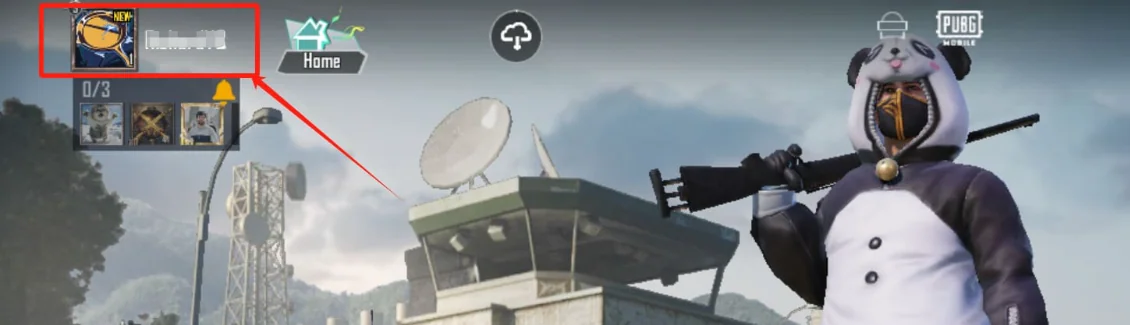
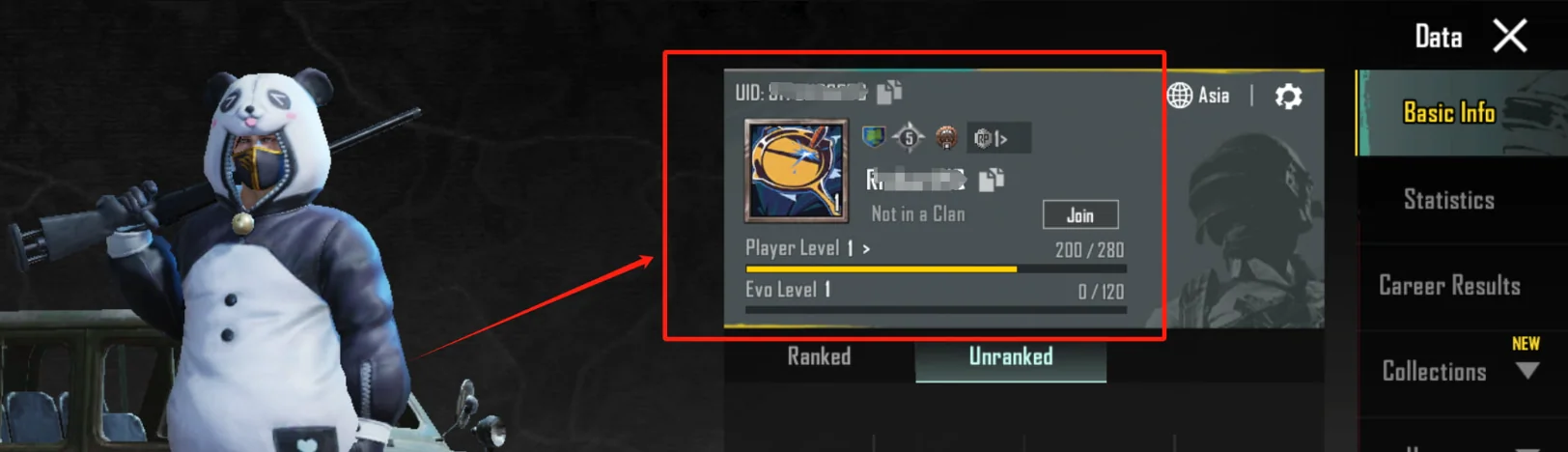
You can see your player ID in-game on the profile screen, right next to the ID or UID label just below your name. Make sure you copy this number correctly, because a top-up by ID cannot be reversed. Being careful not to leave spaces or extra characters when entering the ID is important for your order to be processed without issues.
Things to Watch Out For
The most critical step in top-up by ID is entering the player ID information correctly; a top-up made to the wrong ID cannot be reversed. These packages are specific to the Global server; don't place an order without making sure your account is registered on the Global version, because UC transfer between different server versions isn't possible. Restarting the app after placing your order can speed up the top-up appearing. Also, if there's additional information requested on the order form (such as server region), filling that in completely is important for the transaction to be completed smoothly.
When Is PUBG Mobile UC ID Top-Up Delivered?
When the ID information is entered correctly, the UC or pass top-up usually happens automatically right after order confirmation. Delivery may take a bit longer during busy hours or for orders requiring system checks; in such a case you can track the order status from your account, and if you experience a long wait, you can get information through live support.
Why Oyuneks?
When the correct ID is entered, the top-up happens automatically and usually instantly. Every order you place is stored in your account's order history; you can access it there if you want to double-check your ID information. If you experience an issue during the top-up process, the live support team will help you. By choosing the option that best fits your need among different denominations and pass options, you can reach the content you're targeting without unnecessary spending.
No reviews yet
Customers who bought this product can leave a review; the first one will appear here.
PUBG Mobile Global ID: How Do You Top It Up?
- Log in to oyuneks.com.
- Choose the PUBG Mobile Global ID package.
- Correctly fill in the requested PUBG Mobile oyuncu ID information and click the BUY NOW button.
- That's it, done! Your UC will be automatically loaded into your account.
Best-Priced PUBG Mobile Global ID — the right address is oyuneks.com!
How Can I Find My PUBG Mobile Player ID?